
4.1. New audio file

Go to menu Files -> New
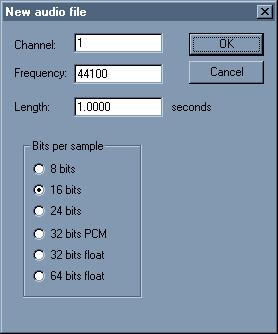
New file dialog box
Channel:
Enter the channel number in the edit, 1 for MONO, 2 for STEREO.

Frequency:
Enter the samplerate in this edit (it won't affect the playback samplerate).

Length:
Enter the length in seconds of the file to be created in this field.

Bits per sample:
Select the bit depth of the file to be created.
Manage Volume of the sound in the mix
by: Rex
Jul 19, 2008, 12:14 am

Ubuntu Support
by: Wavosaur Main Developer
Jul 15, 2008, 8:27 pm

Wavosaur markers in other apps or plugs (UPDATED 10/07/08)
by: Wavosaur Main Developer
Jul 15, 2008, 8:27 pm

Wavpack file support
by: Rex
Jul 14, 2008, 4:18 pm

white noise continous loop
by: Rex
Jul 5, 2008, 4:54 pm

Pause on keyboard coming???
by: nanrector
Jul 4, 2008, 11:00 pm

Rack Options
by: palancar
Jun 30, 2008, 11:41 pm

in "loop" mode play only the loop
by: asseca
Jun 29, 2008, 3:22 pm

Open multiple files via command-line
by: Rex
Jun 29, 2008, 1:16 pm

Batch convert (bit/s)
by: Rex
Jun 28, 2008, 10:13 pm

Downsampling and reducing depth
by: Wavosaur Main Developer
Jun 27, 2008, 8:03 pm

save as amiga iff?
by: Wavosaur Main Developer
Jun 26, 2008, 12:23 pm

Free mastering effects VST
by: monkeybumper
Jun 25, 2008, 1:31 am

what i want
by: lukejay
Jun 23, 2008, 6:55 am

Initial Audio Configuration
by: Rex
Jun 14, 2008, 4:10 pm