
3.2. Audio routing

Go to menu Options -> Audio routing
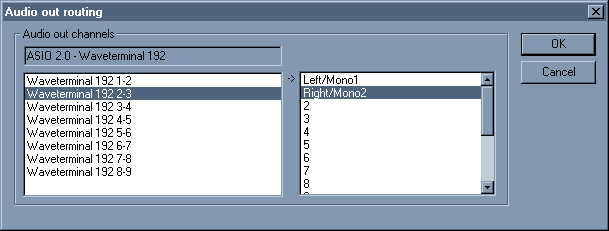
Audio routing dialog box

Depending on your soundcard/drivers you can have more than two outputs.
This configuration window lets you choose the routing for audio output.


The left tab displays your soundcard outputs.
The right tab displays the Wavosaur channels (= the .wav channels)

Select in the left tab the soundcard audio output, and make it match to the wav channel you want.

- You can send the main stereo channels (0 & 1) to all your outputs.
- You can send all the 16 wav channels to different outputs (if you have enough audio out!) for multichannel wav.
- You can invert left & right outputs.
- Etc.
batch processing: adding time +vst effects
by: moljen
Jan 27, 2012, 10:16 pm

Effects/Filter/RC filter: some help ?
by: pmg
Jan 21, 2012, 12:31 pm

Time stretch
by: _safari_
Jan 20, 2012, 11:36 pm

Odd error
by: Wavosaur Main Developer
Jan 17, 2012, 8:09 pm

white noise with Wavosaur and Mbox
by: Wavosaur Main Developer
Jan 17, 2012, 8:06 pm

10 feature requests / suggestions for improvement
by: Wavosaur Main Developer
Jan 10, 2012, 6:53 pm

Record 24 bits audio
by: wavedog
Jan 10, 2012, 9:24 am

WASAPI (exclusive mode) in/out support for Windows 7/Vista
by: wavedog
Jan 10, 2012, 9:17 am

-120dB option for the Peak Meter
by: wavedog
Jan 10, 2012, 8:40 am

Temp File Instead of only RAM/Pagefile
by: FordMustang
Jan 8, 2012, 2:14 pm

Pagefile versus temp directory?
by: AEN007
Jan 8, 2012, 10:54 am

Better MP3 file integration (Save menu saves mp3 fileas mp3)
by: Wavosaur Main Developer
Jan 5, 2012, 8:42 pm

Congratulations on v1.06!
by: Wavosaur Main Developer
Jan 5, 2012, 7:49 pm

how to slow music down
by: horacefarrow
Jan 4, 2012, 12:20 am

Keystrokes
by: Ianpb
Jan 3, 2012, 3:46 am