
10.1. Loop points edition

Wavosaur can recognize loop points and markers information embedded in .wav files.
You can also create loop points and insert markers in Wavosaur.
These informations are saved in the .wav file.
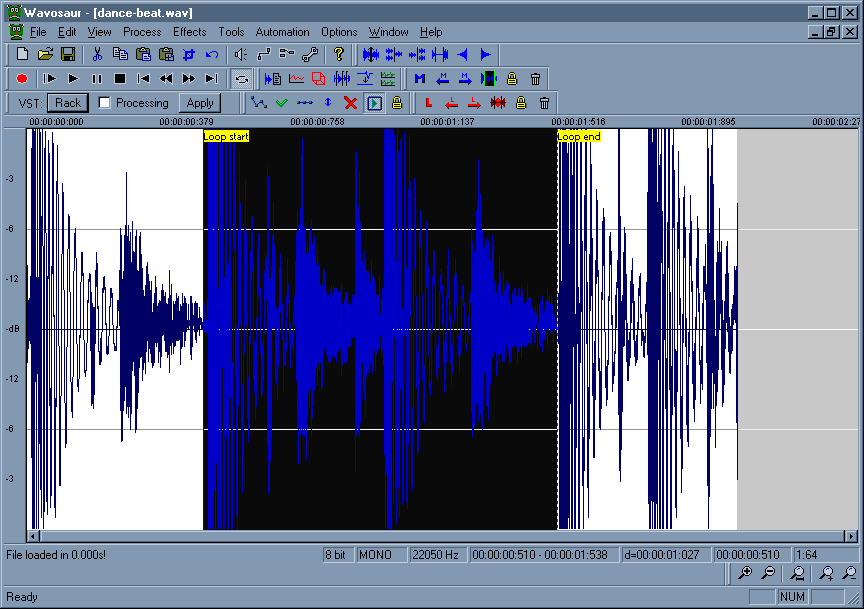
Loop points edition in Wavosaur
To insert loop points in your file, press the "L" key or go in menu Tools -> Loop -> Create loop points.
Loop points are inserted at selection start and stop, if there's no selection, loop points are inserted at file start and file end.
You can drag the loop points with the mouse. Double click inside the loop points make out a selection.

Right click on a loop point brings out the loop menu:

Loop points popup menu

From this loop popup menu you can select Properties, it's also available by going to the menu Tools -> Loop -> Properties
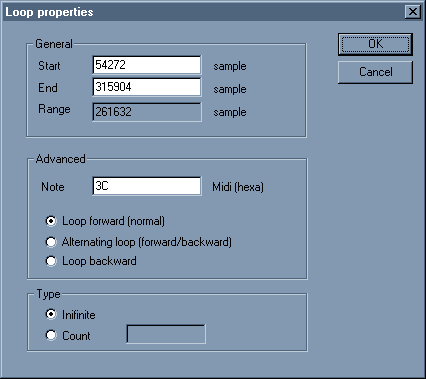
Loop points properties window

You can enter a MIDI note value (enter the hex code !) for the root note.
You can select the loop type and number.
This loop informations can be read in samplers.
Manage Volume of the sound in the mix
by: Rex
Jul 19, 2008, 12:14 am

Ubuntu Support
by: Wavosaur Main Developer
Jul 15, 2008, 8:27 pm

Wavosaur markers in other apps or plugs (UPDATED 10/07/08)
by: Wavosaur Main Developer
Jul 15, 2008, 8:27 pm

Wavpack file support
by: Rex
Jul 14, 2008, 4:18 pm

white noise continous loop
by: Rex
Jul 5, 2008, 4:54 pm

Pause on keyboard coming???
by: nanrector
Jul 4, 2008, 11:00 pm

Rack Options
by: palancar
Jun 30, 2008, 11:41 pm

in "loop" mode play only the loop
by: asseca
Jun 29, 2008, 3:22 pm

Open multiple files via command-line
by: Rex
Jun 29, 2008, 1:16 pm

Batch convert (bit/s)
by: Rex
Jun 28, 2008, 10:13 pm

Downsampling and reducing depth
by: Wavosaur Main Developer
Jun 27, 2008, 8:03 pm

save as amiga iff?
by: Wavosaur Main Developer
Jun 26, 2008, 12:23 pm

Free mastering effects VST
by: monkeybumper
Jun 25, 2008, 1:31 am

what i want
by: lukejay
Jun 23, 2008, 6:55 am

Initial Audio Configuration
by: Rex
Jun 14, 2008, 4:10 pm