
4.2. Open audio files

Go to menu Files -> Open
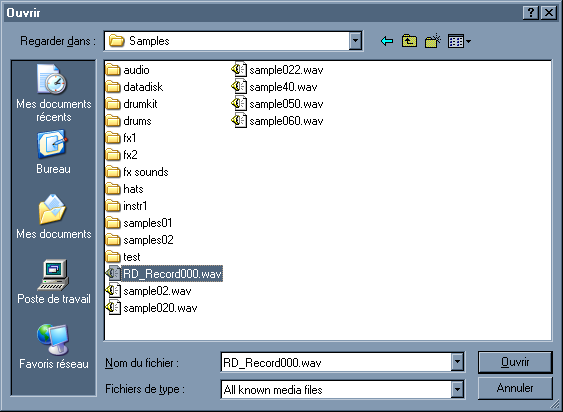
Open files dialog box

Open a .wav/.iff/.aif/mp3 file, and displays its waveform the main editor view.
By default the file dialog shows all the .wav files, select in the filetype dropdown menu the "file display filter" you want:
.wav, .aif, .iff, .au, .snd, .voc, .mp3, .vox, all files, all known media files.
If a file can't be opened you can try to use the "import" feature.
Wavosaur displays the opening/importing time in the statusbar.
Manage Volume of the sound in the mix
by: Rex
Jul 19, 2008, 12:14 am

Ubuntu Support
by: Wavosaur Main Developer
Jul 15, 2008, 8:27 pm

Wavosaur markers in other apps or plugs (UPDATED 10/07/08)
by: Wavosaur Main Developer
Jul 15, 2008, 8:27 pm

Wavpack file support
by: Rex
Jul 14, 2008, 4:18 pm

white noise continous loop
by: Rex
Jul 5, 2008, 4:54 pm

Pause on keyboard coming???
by: nanrector
Jul 4, 2008, 11:00 pm

Rack Options
by: palancar
Jun 30, 2008, 11:41 pm

in "loop" mode play only the loop
by: asseca
Jun 29, 2008, 3:22 pm

Open multiple files via command-line
by: Rex
Jun 29, 2008, 1:16 pm

Batch convert (bit/s)
by: Rex
Jun 28, 2008, 10:13 pm

Downsampling and reducing depth
by: Wavosaur Main Developer
Jun 27, 2008, 8:03 pm

save as amiga iff?
by: Wavosaur Main Developer
Jun 26, 2008, 12:23 pm

Free mastering effects VST
by: monkeybumper
Jun 25, 2008, 1:31 am

what i want
by: lukejay
Jun 23, 2008, 6:55 am

Initial Audio Configuration
by: Rex
Jun 14, 2008, 4:10 pm