
4.4. Import / export audio files

To import a file :
Go to menu Files -> Import -> Import binary file
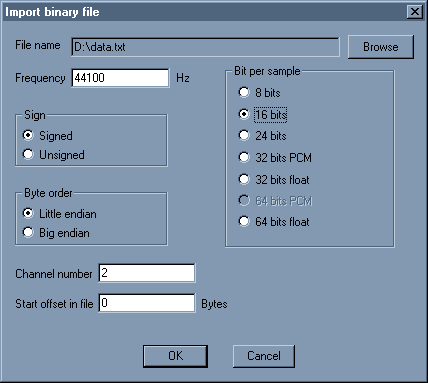
Import binary file dialog box

You can import any file, choose the settings for samplerate, bitdepth, sign, channel number and byte order.
You can also select an offset to skip the first n bytes of the file.


To export a file :
Go to menu Files -> Export -> Export as mp3
You need the lame_enc.dll to be present in the Wavosaur folder (or system folder).
You can choose you bitrate for MP3 encoding:
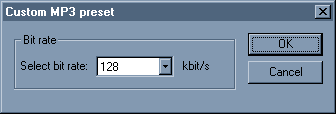
Export mp3 dialog box
Go to menu Files -> Export -> Export all regions
This feature exports all the data regions delimited by markers in separated files.

Go to menu Files -> Export -> Export as text This feature exports the current files in text format, for using in application such as Excel, Matlab, PSpice etc.
It's not recommended to export long files as text!
How do you remove a background vocal?
by: ZooTooK
Mar 12, 2010, 10:43 am

BPM wave files reconstructing
by: willard
Mar 10, 2010, 5:28 am

Ozone 4 in Wavosaur
by: R.A.W.
Mar 9, 2010, 9:12 pm

using dbglitch in wavosuar
by: R.A.W.
Mar 9, 2010, 9:10 pm

Name / Label of Markers
by: xpander
Mar 4, 2010, 8:33 pm

Silence Trimmer
by: xpander
Mar 4, 2010, 8:13 pm

Db analyse between marker point
by: xpander
Mar 4, 2010, 7:41 pm

only part of a WAV file loads
by: xpander
Mar 4, 2010, 7:13 pm

Removing certain soundsofa direct recording from a video cam
by: Rex
Feb 26, 2010, 1:44 pm

Newcomer of Kells
by: FordMustang
Feb 23, 2010, 8:30 pm

Missing waves plugins with Cubase 5
by: Blaxroses
Feb 22, 2010, 7:02 pm

Mono recording, still stereo
by: geoslake
Feb 22, 2010, 2:42 pm

hi removing back groud noise and just using vocals
by: killstablo
Feb 16, 2010, 5:41 pm

Would need Flac-file support
by: xenosaur
Feb 14, 2010, 7:32 pm

Is this even POSSIBLE?
by: FordMustang
Feb 14, 2010, 6:02 pm

Feeltune Rhizome