9. Volume automation
Use this menu to insert a volume enveloppe, you can edit this enveloppe to create a volume automation between -inf dB & +6 dB.
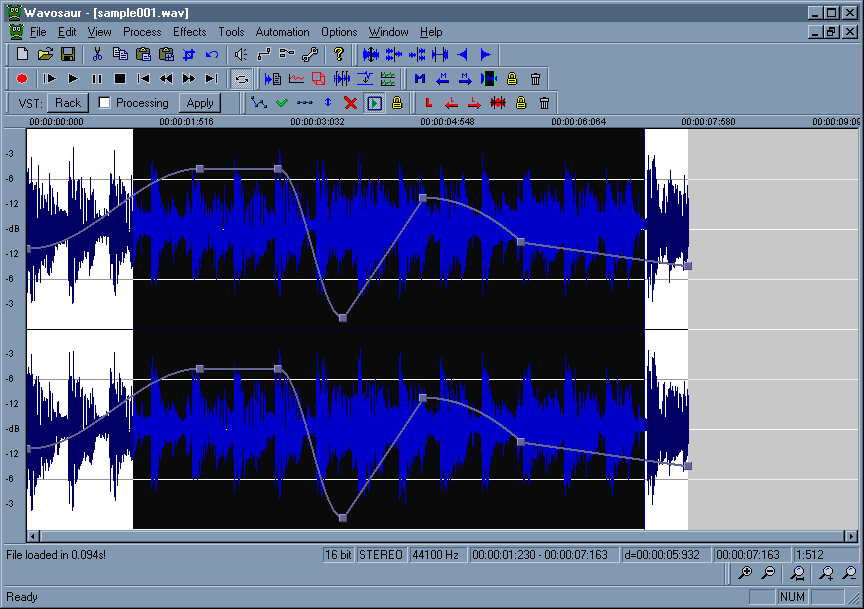
Use the Automation menu (or the toolbar) to create/apply/reset/flip/delete/preview a volume enveloppe automation.

Inserting an automation:
Go to menu Automation -> Create volume
It inserts a predefined 4 points volume enveloppe
Deleting an automation:
Go to menu Automation -> Kill volume
This deletes the enveloppe
Reseting an automation:
Go to menu Automation -> Reset volume
This reset the enveloppe to a two points enveloppe (0 dB)
Editing an automation:
- Double click on the enveloppe to create a new point
- Left click+ drag to move the point with the mouse : the point value in dB is displayed while you drag the point.
- Double click on a point to delete the point
- Right click on a point to bring out the automation popup menu
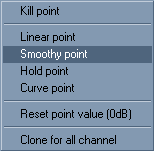
-Kill point : delete the point
-Linear/Smoothy/Hold/Curve : the type of the enveloppe between this point and the next point
-Reset point value : set the point value to 0 dB
-Clone for all channel : copy the enveloppe to all the channel
Previewing/realtime automation:
Go to menu Automation -> Realtime
When checked (by default) you can hear the effect of the volume automation in real time, if you uncheck the preview you won't hear the volume change until you hit apply
Applying the automation:
Go to menu Automation -> Apply volume
The volume enveloppe is applied to the sample