6.1. Select / zoom / scroll

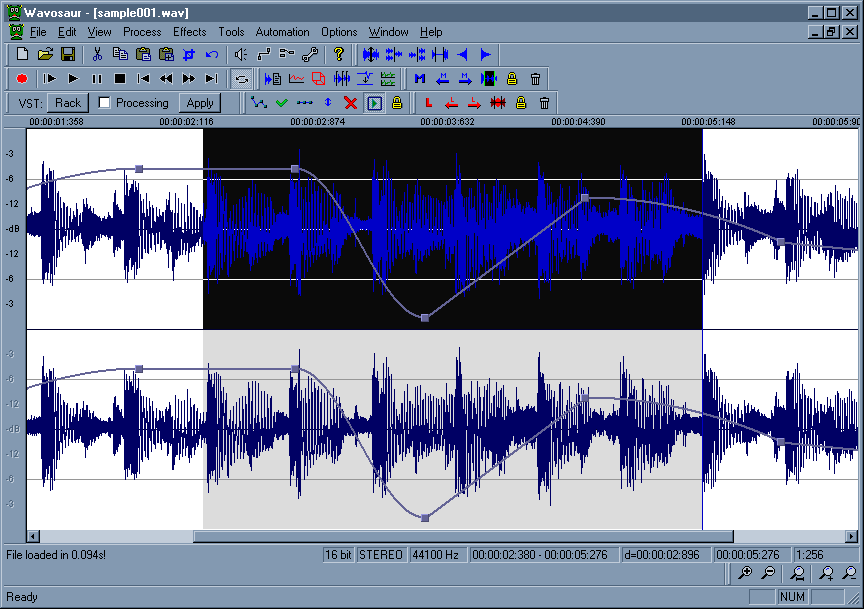
Markers edition in Wavosaur
Selecting:
Use the mouse to select an audio range.
You can also use your keyboard : Shift + Arrow
CTRL+A select all the file.
Double mouse click select all the file (if there's no loop points or markers)
Double mouse click select data inside a loop if loop point are presents.
Double mouse click select data between two markers if markers are presents.

Scrolling:
Use mouse right click + drag to move the view.
You can also use the scrollbar.

Zoom:
Use the mousewheel to zoom in/out in time, you can also use the up an down arrow keys on your keyboard.
Use CTRL+mousewheel to zoom in/out in amplitude

Channel selecting:
Use your keyboard (the 1...8 keys) to select/deselect the wav channels : the deselected channel have their output muted.
batch processing: adding time +vst effects
by: moljen
Jan 27, 2012, 10:16 pm

Effects/Filter/RC filter: some help ?
by: pmg
Jan 21, 2012, 12:31 pm

Time stretch
by: _safari_
Jan 20, 2012, 11:36 pm

Odd error
by: Wavosaur Main Developer
Jan 17, 2012, 8:09 pm

white noise with Wavosaur and Mbox
by: Wavosaur Main Developer
Jan 17, 2012, 8:06 pm

10 feature requests / suggestions for improvement
by: Wavosaur Main Developer
Jan 10, 2012, 6:53 pm

Record 24 bits audio
by: wavedog
Jan 10, 2012, 9:24 am

WASAPI (exclusive mode) in/out support for Windows 7/Vista
by: wavedog
Jan 10, 2012, 9:17 am

-120dB option for the Peak Meter
by: wavedog
Jan 10, 2012, 8:40 am

Temp File Instead of only RAM/Pagefile
by: FordMustang
Jan 8, 2012, 2:14 pm

Pagefile versus temp directory?
by: AEN007
Jan 8, 2012, 10:54 am

Better MP3 file integration (Save menu saves mp3 fileas mp3)
by: Wavosaur Main Developer
Jan 5, 2012, 8:42 pm

Congratulations on v1.06!
by: Wavosaur Main Developer
Jan 5, 2012, 7:49 pm

how to slow music down
by: horacefarrow
Jan 4, 2012, 12:20 am

Keystrokes
by: Ianpb
Jan 3, 2012, 3:46 am